


Your warehouses are perfectly organized and each item is in place? This is great but, it can get better: with the hierarchical view of the Bin Location Content List report, you can get a detailed view of each warehouse, sub-level or bin, with exact quantities and other details related to the given items.
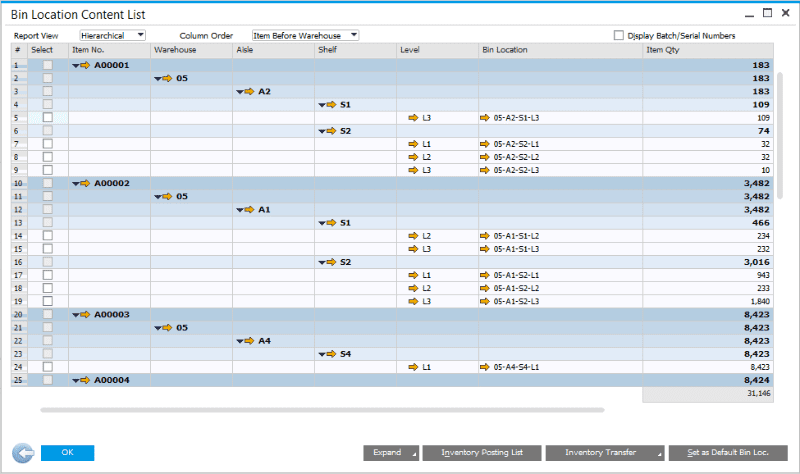
To generate the report choose: Inventory > Inventory Reports > Bin Location Content List. In the “Bin Location Content List” window, in the “Report View” choose the option: “Hierarchical”. Now you can adjust the column order, the granularity of the data, and much more.
You can also generate the report for a given item and warehouse from the context menu within Item Master Data > Inventory Data tab.
Available since SAP Business One 9.1, version for SAP HANA PL04 and SAP Business One 9.1 PL04.
This tip and all the other tips are available in:
http://scn.sap.com/blogs/b1_tip_of_the_week/2016/02/17/sap-business-one-tips-are-one-click-away
Source:https://www.linkedin.com/pulse/zoom-hierarchical-view-bin-locations-ari-schapira
Author:Ari Schapira
 US
US  CN
CN