


The Open Items List is one of the very first reports in SAP Business One and is commonly used. It’s main goal is to list the open documents, however there are few tasks you can perform directly from within the report that can make your work more efficient.
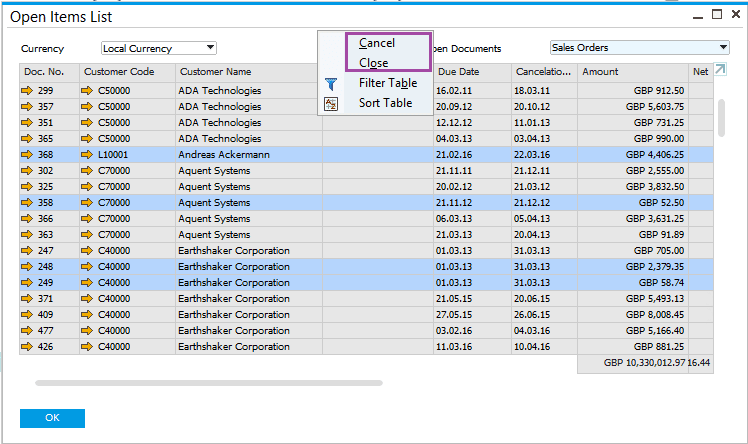
You can cancel and close multiple documents at once by displaying the open documents of the required type, for example Sales Orders, highlight the relevant documents, and from the context menu choose “Cancel” or “Close”.
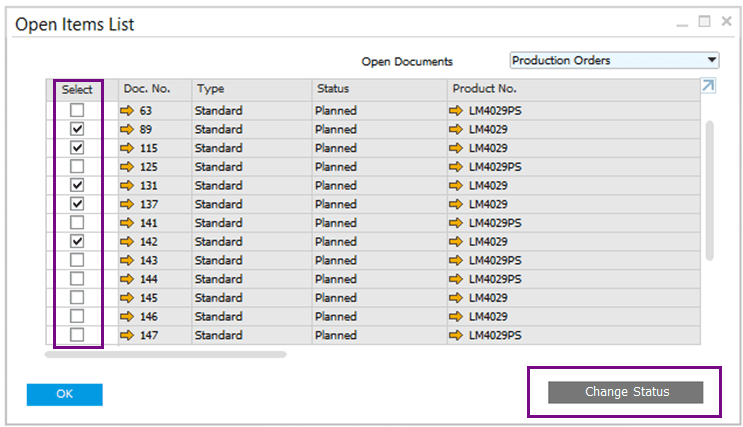
In addition, you can update the status of multiple open production orders:
Available in SAP Business One 9.2, version for SAP HANA PL05 and SAP Business One 9.2 PL05.
This tip and all the other tips are available on the Tip of the week SCN page. You can also visit the Implementation Arena for useful implementation tips.
Source:https://www.linkedin.com/pulse/more-open-items-list-ari-schapira?trk=mp-reader-card
Author:Ari Schapira
 US
US  CN
CN